Build the schedule
Create, copy, revise, and organize shifts in one operating workspace.

OneClick Q will be fully capable of replacing HotSchedules before January 1, 2027, bringing scheduling, labor intelligence, and leader-guided assistance into the operating system your restaurant already uses.
You do not have to replace HotSchedules. Q works either way. Keep HotSchedules and OneClick keeps syncing with it, or move scheduling into OneClick when you are ready. The timing is yours.
Already being piloted by a limited number of OneClick customers.
Request pilot access Full replacement capability
Targeted before January 1, 2027
Full replacement capability
Targeted before January 1, 2027
One schedule. One system.
01Build02Staff03Adjust04DecideReplacement coverage
We are bringing the workflows restaurant leaders rely on into a single schedule and a single source of truth.
Create, copy, revise, and organize shifts in one operating workspace.
Apply layouts, dayparts, recurring patterns, and reusable shift structures.
Match employees to open shifts using availability, role, and qualification context.
Understand labor-plan needs, gaps, and demand before the schedule is published.
Manage open shifts, assignments, revisions, and the decisions after the first draft.
Ask for explanations and recommendations while keeping every decision with the restaurant leader.
Release timing and transition details will be communicated as capabilities move from development into customer availability.
A few details that help leaders plan the week and run the shift. Meet Q and explore its scheduling, coverage, and training features.
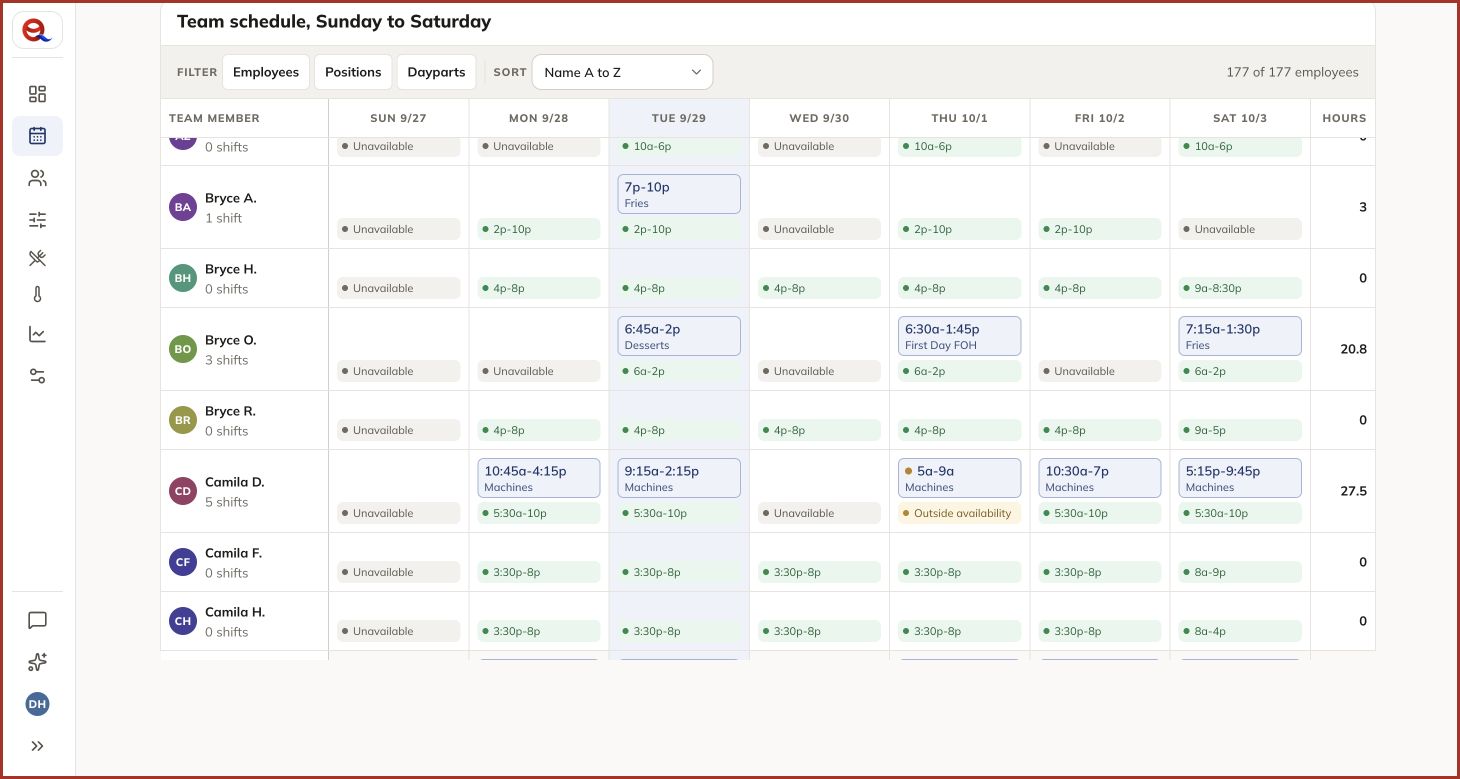
Keep each person’s availability in view while you build the week.
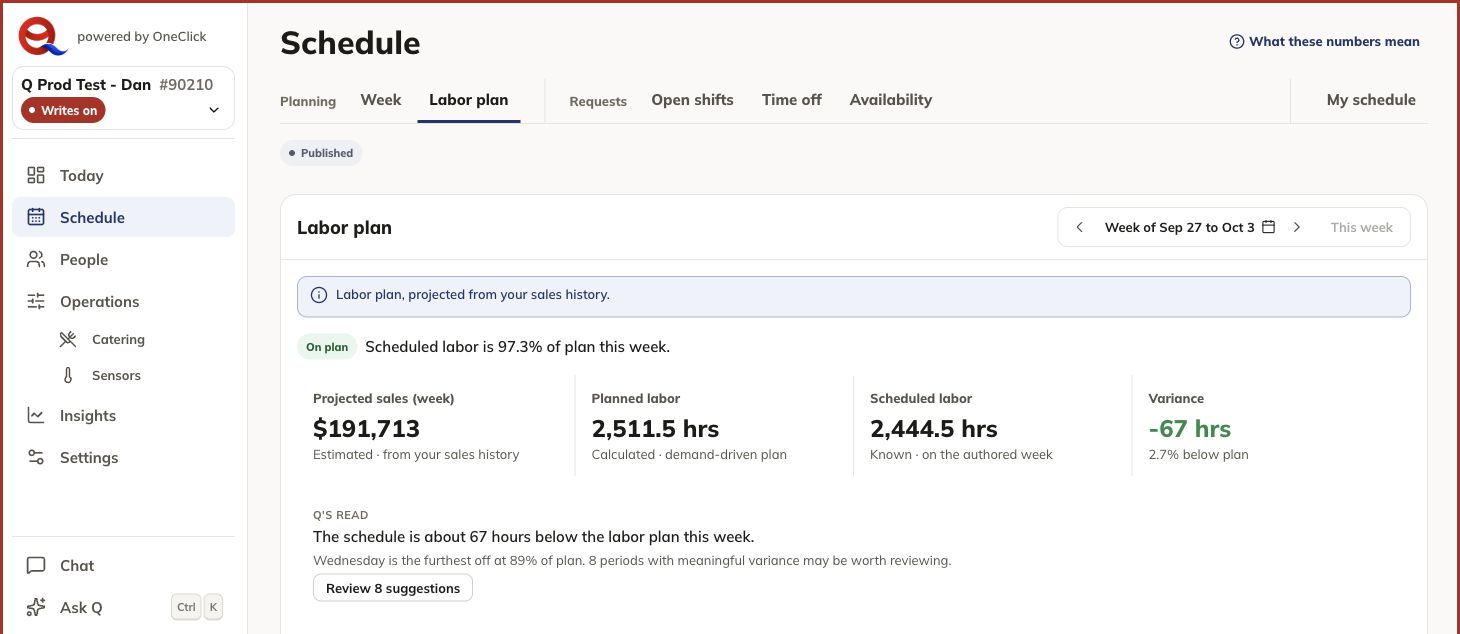
Compare scheduled hours with your labor plan. Q points out differences for you to review.
Ask about scheduled hours and the labor plan. Q explains the totals and highlights where a leader should review coverage.
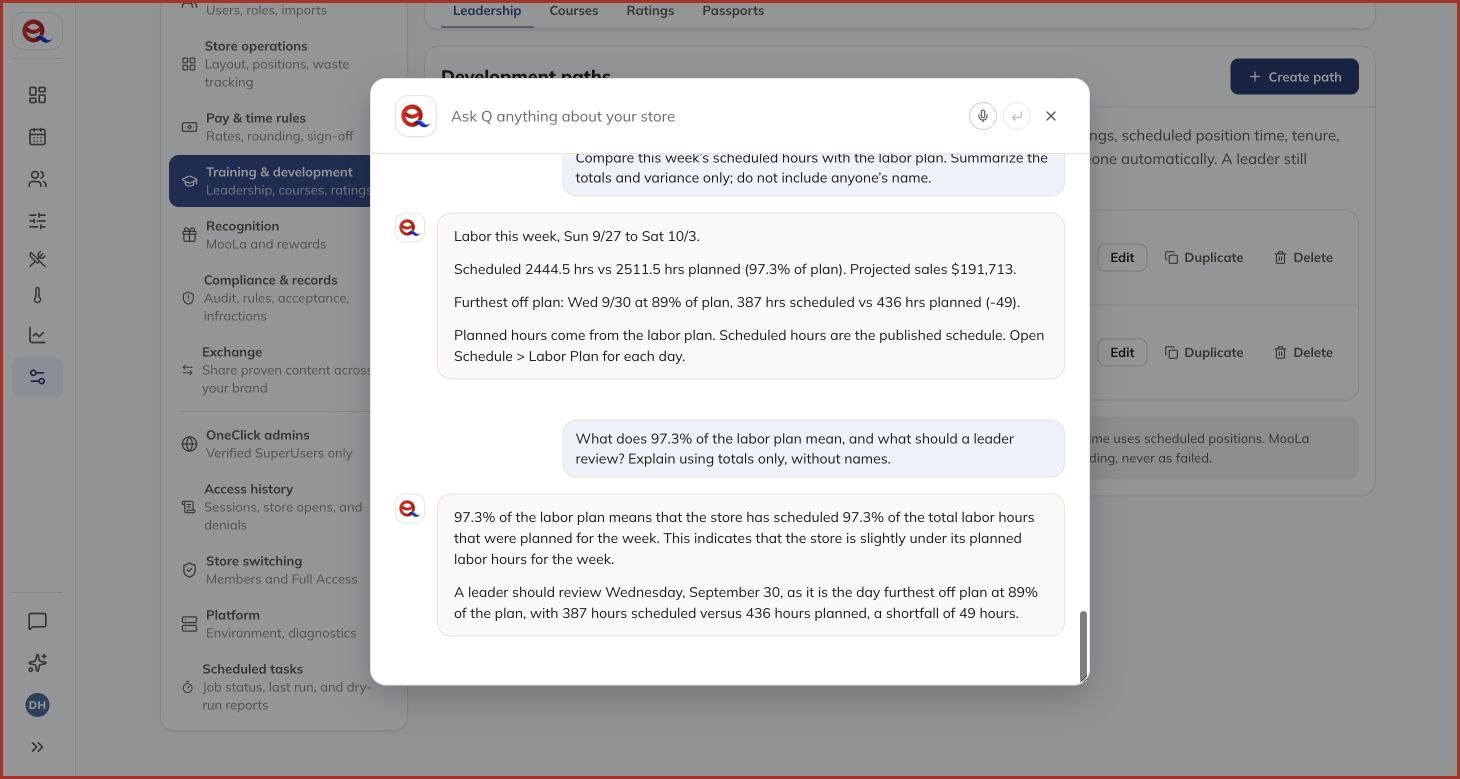
Screenshots from Q’s test workspace. Pilot features and screens may change.
One underlying schedule
These are different perspectives on one schedule, not separate scheduling systems.
Balance availability, qualifications, restrictions, and existing hours.
Build the coverage structure, then staff it.
Plan every role, station, and job that must be covered.
Respond to training, readiness, ratings, and operational needs.
Compare forecast, labor plan, coverage, gaps, and tradeoffs.
Intelligence with boundaries
Q works across the schedule rather than creating a separate AI scheduler. It can help leaders understand what is happening and prepare the next action, while publishing, assignment, material change, and sensitive decisions remain with authorized people.
Our security promise
Restaurant scheduling can involve employee information, operating performance, forecasts, training signals, and proprietary business context. OneClick intentionally designs Q to protect Chick-fil-A® information and every other customer's data.
A shared technology platform never means shared customer data.
Q follows OneClick roles, store access, permissions, and approved workflows.
Only information needed for an approved task should be sent for model processing.
Q uses specific product capabilities, not unrestricted database access.
Centralized configuration and usage records support verification and review.
If identity, permissions, or an approved source is unavailable, Q limits or refuses the operation.
How Q uses AI
Applies product permissions, customer boundaries, approved tools, and restaurant context.
Provides the governed Google Cloud path, identity, configuration, and operational visibility.
Helps Q understand, reason, communicate, and form a recommendation.
Limited customer pilot
OneClick Q Scheduling is already being piloted by a limited number of OneClick customers. We are opening a small number of additional pilot spaces for stores ready to test real scheduling workflows and provide direct feedback.
The path forward
We will share capability availability, readiness guidance, and transition steps as we approach full HotSchedules replacement capability before January 1, 2027.
Follow OneClick updates as scheduling capabilities become available.
Review the workflows and information your leaders use today.
Move with a clear plan, documented readiness, and OneClick support.
Straight answers
No. OneClick independently uses Gemini through Vertex AI in its own Google Cloud architecture. We do not claim Chick-fil-A® endorsement, approval, or corporate integration.
No. Shared technology does not mean shared data. OneClick customer and store boundaries remain in force. Any new customer-specific or corporate data connection would require explicit authorization and review.
No. Q can analyze, explain, and recommend. Authorized leaders remain responsible for publishing schedules, assigning people, and approving material changes.
OneClick is targeting full replacement capability before January 1, 2027. We will communicate release availability and transition guidance as each capability becomes customer-ready.
References to HotSchedules and Gemini Enterprise are provided for factual comparison and context. OneClick does not claim endorsement, partnership, or integration with those products or with Chick-fil-A® corporate systems.