
New Features Release Notes: Version 2.15
-
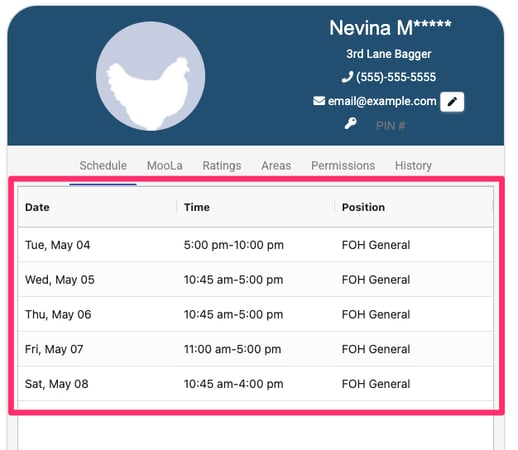
New - Team Member Schedule view. Each team member can see their upcoming schedule on their profile page.
-
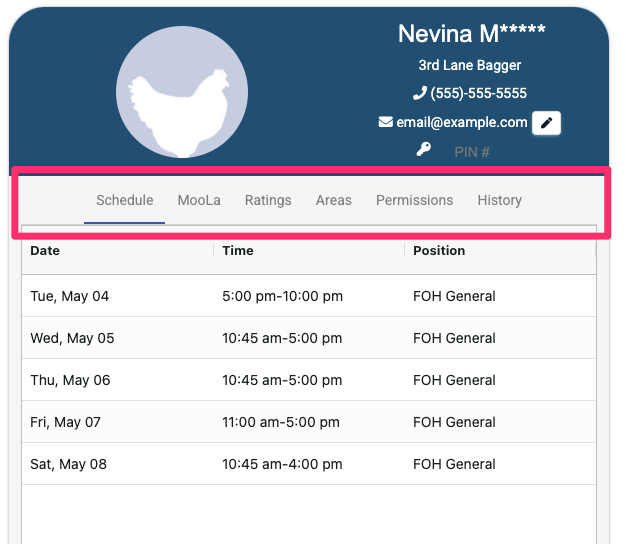
New - Tabs in profile view. Information on profile page is separated on to tabs that can be activated individually.
-
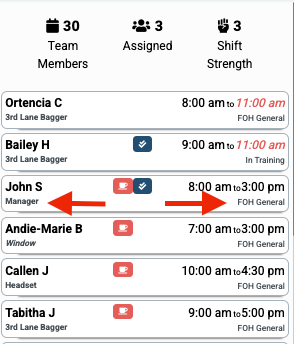
New - OneClickApp assigned job displayed. The Team Member Cards in the Roster display all assignments from the current layout, when assigned, instead of HotSchedules assignment.
-
Improved - Rename Positions in dialog box location. No longer appears off screen at times.
Check Out Our New Resource Guides
Bookmark & Share With Your Team:
-
Onboarding Guide For New Trial Accounts - oneclickapp.com/onboarding
-
FAQs - oneclickapp.com/faq
-
Leader Training - oneclickapp.com/leader-training
-
Team Member Training - oneclickapp.com/team-training
-
10-Minute Pre-Recorded Training Demo - oneclickapp.com/demo
-
Request Layout or Rating Rubric Changes: oneclickapp.com/support-ticket
Not A Customer Yet? Claim Your Free 2-Week Trial!
Stop The Madness Of Using Paper & Spreadsheets To Manage Teams & Trainings.